
Screenwise Panel is one of those programs that instantly catches your attention because it promises something simple.
It claims you can earn rewards just by using your devices as you normally do. No long surveys, daily tasks, or paid offers, just passive earnings.
But before you get too excited, it’s important to look closer. Programs that track your online activity always come with trade-offs, based on my experience, and I would expect Screenwise Panel to be no different.
That’s why I decided to take some time to test it.
So, in this Screenwise Panel review, I’ll walk you through exactly what it is, how it works behind the scenes, what you can realistically earn, and whether the rewards are truly worth the data you give up.
Then, you can decide if you should sign up or not.
What is Screenwise Panel, and what does it offer?
Screenwise Panel is a market-research initiative from Google that is being managed by Ipsos, which is one of the largest market research and data analytics companies in the world.
Now, in case you are wondering, yes, it is legit, since you can really earn rewards from the opportunity it offers.
Speaking of opportunity, let’s discuss how you can earn from it because this is the best way to find out how good it is.
So, here’s how to earn from Screenwise Panel.
The earning opportunity – Data sharing
The only way to earn from Screenwise Panel is by sharing data. After joining, you will be asked to install the required “metering tools”, which could be a browser extension, mobile app, or other meter device.
When I was testing the panel, it was using a high-speed Wi-Fi router to collect data. Just take note that it can change depending on the campaign that is being run.
Now, let me discuss how it worked when I was testing it. When you accept the panel’s offer, Ipsos will mail you the router for free. Then, you will be given instructions on how to install it. Make sure to follow the instructions down to the letter.
After installing the hardware, you will be asked to set up the metering tools, which are designed to track the data that you share.
Now, as for exactly how you will earn, the hardware you’ve installed is designed to quietly monitor your online behavior.
It will gather your data anonymously and send it to Ipsos. Then, Ipsos will check the data and award you with a corresponding number of points. That’s how the earning process works.
Unfortunately, they are not very transparent about how many points you will earn for the data you share. When I was testing the panel, I only managed to earn around $1 in a week, which is right around the average, based on what other members say.
So, it takes a while before you can earn a decent amount. When I was testing the panel, I was mainly just using my laptop and sometimes my phone. You might earn more if there are more devices connected to the router, but again, they aren’t exactly very clear on how the reward system works, which is one of the biggest disadvantages of this panel, in my opinion.
Overall, the earning opportunity requires very little effort on your end after you set up everything. So, if you like passive ways to earn, this can be an option. The downside is that the earning opportunity it offers can be considered invasive, even though the panel says it shares your data anonymously.
Recommended: Check Out the Best Passive Income Apps
How do you get paid?
As explained above, you will earn points from sharing your data. Now, the big question is, what can you do with the points you’ve earned?
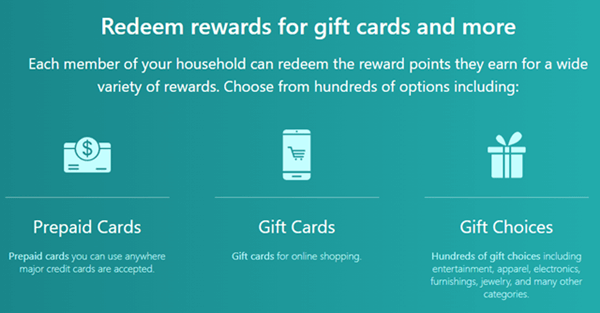
Here’s where it’s not quite clear. The website says you can redeem various rewards using the points you’ve earned. It says you can redeem prepaid cards, gift cards, and even various products. The problem is that they don’t exactly explain how you can redeem the said rewards.
Normally, websites would tell you how many points you need to earn a specific reward. I never encountered any information about how its payout system works when I tested it, so I can’t tell you what the threshold is to redeem the reward.
But based on feedback from other members, the threshold is $25 the first time you withdraw your earnings. It’s quite a high threshold, so you’ll have to wait a while to redeem a reward. However, other members also say that the threshold will be significantly lower ($5) after the first withdrawal.
It’s still uncertain, but if I were to base it on feedback from other people, then I would say its payout system is relatively simple. However, the first threshold is quite high. If you prefer sites with a low payout threshold, I suggest you check out the fastest-paying sites instead.
How much money can you make?
The amount you can earn from Screenwise Panel will depend on how many devices you connect and use. But again, the website does a poor job of explaining how the rewards system works, so I can’t give you an exact amount.
But if I were to base it on my testing, then I would say that its earning potential is not that good. It will take some time to earn enough points to redeem a reward.
This is not surprising, though, because most platforms that offer the same kind of earning opportunity that I have tested over the years don’t offer a very high earning potential.
Can you use it on mobile?
At some point during the setup process, you’ll be asked to install an app that will track the data you share. These are what they would call “meter tools”. So, you will definitely need a mobile device if you want to join Screenwise Panel.
And as explained earlier, for the actual process of earning, you can also use your mobile phone to earn rewards, as long as it is connected to the router that Ipsos sent you. This means you’ll have to connect to the Wi-Fi instead of your phone’s mobile network.
Who can join Screenwise Panel?
Now, here’s the most important part you need to know about Screenwise Panel. It is an invite-only panel, so not everyone can sign up as a member.
They don’t tell you exactly how you can get an invite, but based on my experience, you can usually get it if you’ve signed up as a member of one of its partner platforms.
I got my invite because I signed up as a member of Ipsos’ survey site iSay. However, don’t expect to receive an invite right away when you sign up as a member of other partner platforms. From what I can see, it does look like they send invites at certain periods and not all of the time.
So, you might have to wait a while to join.
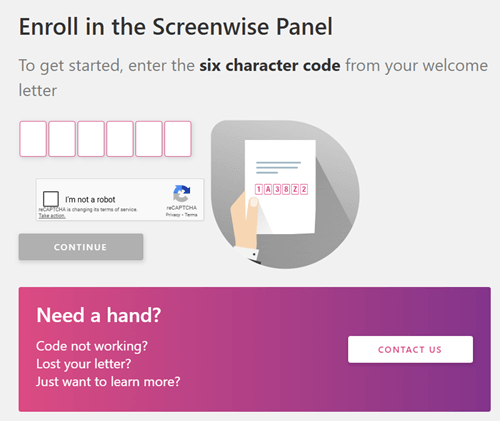
To sign up, you will need to check the invitation letter you will receive via email. The letter will include a code you have to input to complete your registration. After the registration, you’ll have to provide the site with information about the devices you use and where to ship the router. Take note that Ipsos will cover the shipping fee for the router, so you won’t have to spend a dime to earn.
Once you are done registering, all you have to do is wait for the device to arrive. When it arrives, simply set it up according to the instructions provided by Screenwise Panel.
When you are done setting up everything, you can start earning rewards passively by just doing what you normally do with the devices connected to the Wi-Fi router they sent to you.
Can you get support?
If you have questions about the panel, you’ll need to contact its support team since its website doesn’t have a Help or FAQ page you can check out. As mentioned earlier, the website does a poor job of explaining some of the important features of the panel, so you will most likely have questions that need to be answered.
Fortunately, the site does provide a way for you to contact support easily. You can use the contact form provided by the website, or you can also submit your inquiry via email to support@screenwisepanel.com.
Lastly, you can also call their hotline (the number is posted on their Contact Us page) if you want to speak with a representative immediately. Overall, I would say it does provide the minimum required support, since it offers an easy way to ask for help.
That being said, I wish they at least had an FAQ or Help section to address common platform topics, to reduce the need to contact support.
Final Verdict
Screenwise Panel is a legit platform that lets you earn passively by sharing your data. It has a couple of decent features, but it also has some glaring drawbacks you need to consider.
Let me finish this review by summarizing its pros and cons, so you can clearly see an overview of what it offers. Then, you can decide if it is worth pursuing or not.

Pros:
- Offers a passive way of earning
- You don’t have to spend money to start earning

Cons:
- Not transparent with some of the features of the panel
- Low rewards
- The mode of earning can be considered invasive
- Invite-only panel
In my opinion, Screenwise Panel is not for everyone. First, it is an invite-only panel, so if you didn’t receive an invitation to join, then this is not for you. Aside from that, the actual earning opportunity is a bit invasive, so if you prefer your privacy, this is also not for you.
I would only recommend you join this panel if you get an invite, and if you are okay with sharing your data with another company. Just remember that its earning potential is quite low, so it will take a while before you can earn a significant amount.
If you prefer sites that will let you earn a decent amount quickly or ones that don’t require an invitation, I recommend you check out the top survey and GPT sites in your country instead. The sites and apps on this list all have good earning potential, so you can earn a decent amount in a short time.
Plus, they are all sites and apps that don’t require any invitation to join.
If you have any comments, questions, or experience with Screenwise Panel, I would love to hear from you in a comment below.